
The Annual Holiday Accrual Report provides a detailed, real-time breakdown of employee holiday data. This guide explains how to access the report, interpret its fields, and use it effectively to manage holiday balances and risk.
🧭 Accessing the report
- Click the graph icon along the top row to access the reporting suite
- Click 'Annual Holiday Accrual' under 'Holiday'
- This will load a breakdown of the holiday positions of employees at the site currently being viewed
(shown in the top right)
🔍 Reading the report
Each column in the report provides specific insights into holiday entitlement, usage, and value.
The below displays each of the four parts of the report and each section what the variables mean and how they are displayed
Part 1
Use the dropdown at the top to select "Last Financial Year" to view data from the previous holiday year. To include leavers, enter a date in the "Leavers after date" field (before their leaving date) and click "Load".
Part 2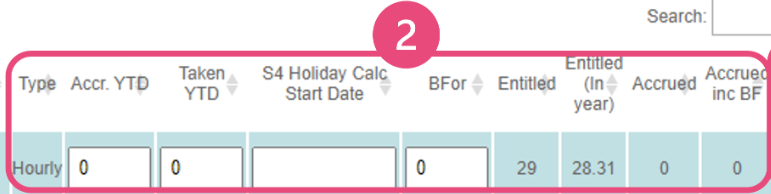
Type
- Daily = Salaried staff
- Hourly = Hourly-paid staff
BFor (Brought Forward)
Holiday carried over from the previous year. This depends on individual company carry over rules and Employee holiday from the prior year
Entitled
Based on contractual terms.
- Shown in days for all staff
Entitled (in year)
Adjusted entitlement for employees who joined mid-year. Includes brought forward value.
Accrued
Holiday earned so far:
Hourly: typically 12.07% of hours worked
Salaried: typically 0.54 days/week
- Shown in hours for hourly staff
- Shown in days for salaried staff
Accrued inc BF
Accrued holiday including any brought forward time.
Part 3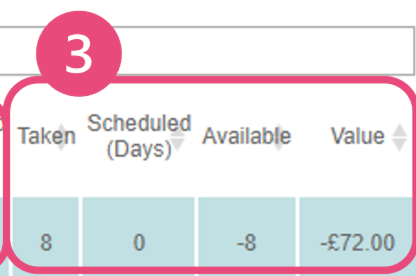
Taken
Holiday already taken this year.
- Shown in hours for hourly staff
- Shown in days for salaried staff
Scheduled (Days)
Future holiday bookings.
- Shown in days for all staff
Available
Holiday remaining = Accrued (inc BF) - Taken - Scheduled
- Shown in hours for hourly staff
- Shown in days for salaried staff
Value
Monetary value of available holiday:
- Based on salary or hourly rate
- Includes run rate for hourly staff
- 💰 Positive = owed to employee if they leave
❗ Negative = holiday debt (risk to business)
Part 4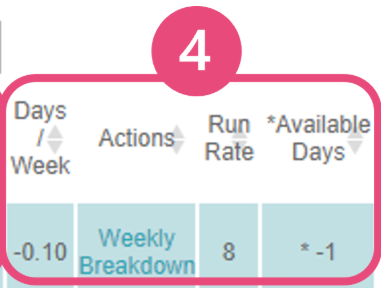
Days/Week
Average number of days per week an employee needs to take to use all remaining holiday before year-end.
Weekly Breakdown
View holiday position week-by-week for current or previous year.
Run Rate
For hourly staff:
- Average hours worked per shift over past 52 weeks
- Used to calculate paid hours for holiday taken
➡️ E.g., Run Rate = 8.0 → 2 days holiday = 16 paid hours
Available Days
The Available Days column shows how many days of leave an employee has accrued and can still book.
Hourly Staff: This value is derived by dividing the total hours in the Available column by the employee’s run rate (average shift length).
- Since the run rate is dynamic and updates over time, the number of available days may fluctuate as the employee’s working patterns change.
Employees see this figure when submitting a holiday request.
Approvers also see this value when reviewing the request.
💡 Interpreting Holiday Debt
❗ Holiday Debt = Negative Value in the "Value" Column
A negative value means the employee has taken more holiday than they've accrued. This is important for:
-
Exit Scenarios
If the employee leaves, this amount may need to be reclaimed. -
Risk Management
Holiday debt represents a liability to the business. Monitoring this helps avoid unexpected costs. -
Proactive Planning
Encourage employees with high debt to reduce future bookings or adjust schedules to balance accrual.
✅ Tip: Use the "Days/Week" field to help employees plan how much holiday they need to take weekly to use their entitlement without going into debt.
Important Note:
Holiday requests can be approved even if they result in a negative accrual balance.
However, your organisation may require escalation or override permissions if approving leave that exceeds accrued hours, especially when the rota is closed at the end of the week.
Comments
0 comments
Please sign in to leave a comment.